How to activate WhatsApp booking in Replan, step by step
Is your WhatsApp full of clients asking about appointments? Learn how to activate WhatsApp booking in Replan, connect your calendar and let appointments confirm themselves, without becoming a Meta expert.
August 6, 2026
Your WhatsApp already works as a second front desk. "Any slots on Thursday?", "can you confirm the time?", "I can't make it after all, can we move it?". Messages that start, break off and pick back up at half past eleven at night, when you finally sit down.
Answering each one by hand has a problem: dates get written down wrong, clients ask and never confirm, and you lose time hunting for slots instead of working. WhatsApp is a brilliant channel to talk to your clients, but with no system behind it, it's a terrible channel to book.
That's exactly what this guide is about: turning that channel into a system. You'll see what WhatsApp Bookings is in Replan, how to switch it on without becoming a Meta technician, and what changes in your day once appointments book, confirm and remind themselves.
From "manual WhatsApp" to a booking system
Right now your inbox is doing the job of a diary, and it wasn't built for it. Every conversation is a loose thread you have to translate into an appointment: read it, find the slot, jot it in the notebook or the calendar, go back to the chat to confirm. Four manual steps per message.
That's where the usual slip-ups creep in:
Appointments written down wrong (or not at all)
Between one client and the next, hands full, it's easy to read a message, think "I'll note it later", and leave it sitting in the chat. The appointment exists in WhatsApp, but not in your diary.
Clients who ask and never confirm
Plenty of conversations end in a "I'll let you know" that never comes back. With no flow that ends in a booked appointment, those questions aren't bookings: they're noise you have to reread several times.
Your time spent on the same answers
Finding slots, sending the address, repeating prices and hours: these are repetitive replies that pull you away from the client in the chair, which is where your work really happens.
The goal isn't to stop using WhatsApp. It's to stop letting your routine bookings depend on you staring at your phone.
What "WhatsApp Bookings" is (and what it isn't)
Replan combines two things: a free, unlimited calendar to keep your diary in order, and a premium service, WhatsApp Bookings, that connects that diary to the official WhatsApp API. In plain terms:
- What the client sees: they message you on WhatsApp, see your real slots, pick a service and a time, and get an automatic confirmation. All inside the app they already use every day.
- What you see: the appointment lands straight in your calendar, blocks the slot and assigns the service and professional. Nothing to copy from the chat.
Underneath runs the official WhatsApp Business API, not a homemade bot that keeps breaking. That's exactly the difference between the WhatsApp Business app and a real booking system:
| WhatsApp Business (the app) | WhatsApp Bookings (Replan) | |
|---|---|---|
| How it works | One app on one phone | Official API connected to your calendar |
| Several people at once | One phone, one person | The whole team sees appointments in the calendar |
| Automation | Quick replies typed by hand | Books, confirms and reminds on its own |
| Where the appointment ends up | In a chat you have to copy | Straight into the calendar, no copying |
And to be clear about what it isn't: it's not a marketplace or an external portal-style app where the client "belongs" to another platform. Nor is it an "all-in-one" trying to run your till, stock and campaigns. It focuses on one thing: bookings and diary.
Step 1: get your calendar ready so WhatsApp can work for you
The booking assistant can only offer slots if it knows what slots you have. So before switching anything on, your calendar needs to be reasonably tidy: services with their real duration, your team and their hours. With that, the system knows how much room each appointment takes and which slots it can offer without double-booking you.
That's all it needs. If you haven't set it up yet, the detail is in the free calendar guide: twenty minutes and the base is ready. The thing to remember is simple: with no tidy diary there's no automatic booking that works, because the system can't invent your slots.
Step 2: activate "WhatsApp Bookings" in Replan
Turn it on from Settings
In Replan, go to Settings → Salon → Subscription & Billing and activate WhatsApp Bookings. The pricing is transparent: a base fee of 79 €/month plus the official WhatsApp (Meta) usage, which Replan doesn't mark up. Reckon on around 5 to 7 € a month per 100 appointments, and you can track that usage in real time from your calendar. The calendar, remember, stays free; this is the add-on that brings the automation.
Connect your WhatsApp number
This is where people fear they'll "have to be an IT person", and you won't. Replan handles the Meta registration on behalf of your salon: you just give the number you want to link, fill in your billing details and upload your business documents in Replan. Replan takes care of the rest behind the scenes: the official registration, the Meta verification and the WhatsApp API connection. No code, no technical consoles.
One heads-up before you pick a number: once it's live, the assistant will reply automatically to every WhatsApp conversation on that line. So link a business number, not your personal or family WhatsApp. Even so, you don't lose control: you can open WhatsApp on your phone, read the chats in real time and step in manually whenever you need to.
The messages come ready-made
You don't have to write a thing. Replan comes with the key messages already set up, carrying your salon's name and written to sound clear and human:
- Instant booking confirmation, the moment the client books.
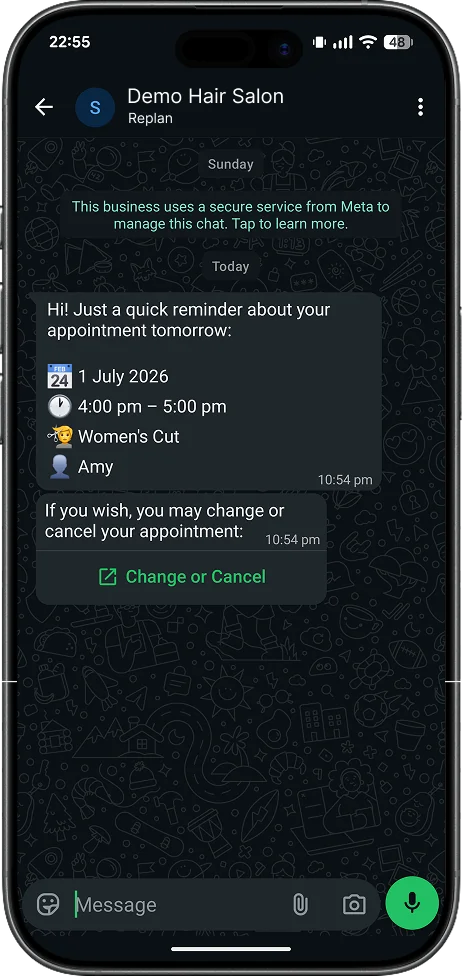
- A reminder before the appointment, so it doesn't slip their mind.
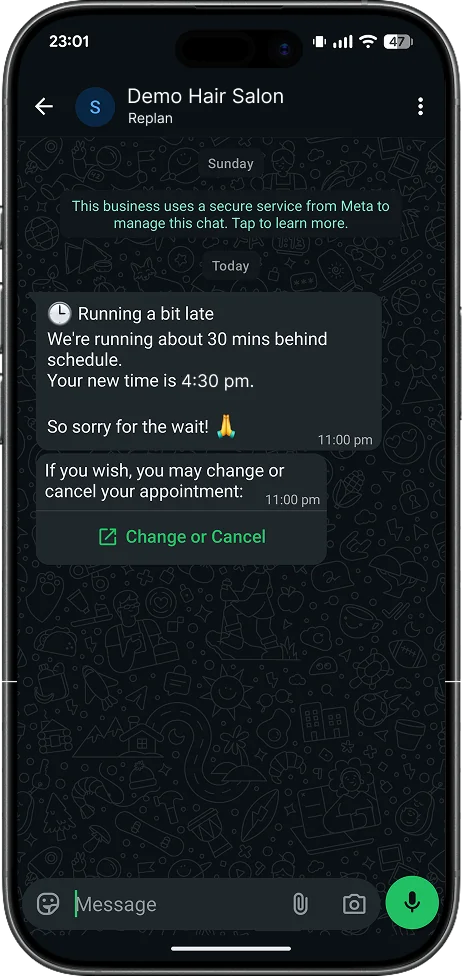
- A change or cancellation notice, to reshuffle without phone calls.
They're proven messages, the same for every salon, so you're spared deciding what to say and when: the system replies on time even while you're mid-colour.
What booking over WhatsApp looks like for the client
It's worth looking at from the other side, because that's where it clicks. Everything happens inside WhatsApp, with no website to visit and nothing to download: the client messages you, sees your services and the real slots available, even picks the professional they prefer, and gets the confirmation instantly. They do the admin of finding a slot themselves; you don't put the dryer down.
Don't just take my word for it: the best way to see it is to try it yourself on your phone. Make a real booking test and see how easy and natural the whole thing feels.
What changes in your day
Appointments land in the calendar by themselves
Every booking made over WhatsApp is written straight into your calendar, with its service and its professional, and blocks the slot. Nothing to copy, no writing the notebook up neatly. No more loose notes and screenshots "to jot down later".
Fewer calls, fewer manual messages
Routine queries, like checking availability, confirming or changing a time, become automatic messages. The client sees the slot, books and gets the reminder; you don't answer one by one. Every booking that comes in on its own is a call you don't take and a message you don't write. That's the whole point, literally: stop taking calls and get back to the client.
Reminders and alerts that recover slots
The system sends the reminder before the appointment and, if you're running late one day or something changes, you alert your next clients in a couple of clicks from the calendar. Other WhatsApp booking providers have spent years documenting notable drops in no-shows when automatic reminders and confirmations are used; that's third-party data, not a figure Replan promises you. What's verifiable is simple: a WhatsApp reminder gets read far more than an email, and rescheduling from the chat keeps the slot from being lost.

When it's worth making the leap (and when it isn't)
Let's be honest: not every salon needs this. The WhatsApp Business app, with quick replies and a bit of discipline, copes fine with low volume. If you have few appointments and answer without stress, the free calendar and manual WhatsApp may be enough for now.
The leap makes sense when volume grows and the app falls short: the inbox fills up, there are several phones or several people answering different things, and you start losing bookings in unanswered messages. That's when "WhatsApp Bookings" stops being a luxury and starts paying for itself with the appointments you no longer let slip. It's not about adding automation for its own sake, but about not losing good bookings in a chat.
Quick questions
1.Which number do I link? Can I use mine?
It should be a business number, not your personal line: the assistant replies to every WhatsApp conversation on that number. Three common scenarios:
- You have a business line with WhatsApp: link that number. It's ideal, because your clients already have it saved and don't have to note anything new. You can still see the chats and reply by hand whenever you want.
- You use your personal WhatsApp for the business: better not to link it. Install WhatsApp on any phone and verify it with the salon's landline to have a separate line just for bookings.
- No landline: a cheap second SIM or a virtual number, dedicated to the salon only, solves it without any hassle.
2.Do I need to know WhatsApp Business API or Meta to switch it on?
No. The API side is handled by Replan behind the scenes. You just do simple verification and connection steps, with no code or technical consoles. If you can use WhatsApp, you know more than enough to activate it.
3.What if the client writes something odd or off-script?
The system is ready for the usual variations, and you can step in manually whenever you want: you keep seeing the chats in real time. We don't sell "magic AI", but a robust flow with room for a person to take over if needed.
4.Does WhatsApp booking really reduce no-shows?
Industry studies and other API providers document fewer no-shows when automatic reminders and confirmations are used. That's third-party data, not a promise from Replan. What's down to you is making the most of those recovered slots; the tool just puts the reminder where the client reads it.
Turn your WhatsApp into a booking agent
If your WhatsApp has become your second front desk, the channel isn't the problem: the problem is there's no system behind it. Replan's free calendar already orders your day; switching on WhatsApp Bookings is the step that turns your number into a 24/7 booking agent connected to that calendar, so you can stop answering every message by hand and get back to the client.
Create your free calendar in Replan
Any questions? Write to us at hello@replanapp.com.
Next read