How to use Replan's free calendar to bring order to your salon's diary
Still juggling a paper diary and a phone full of appointments? Learn how to move your salon's diary to Replan's free calendar without losing bookings or wrestling with 'all-in-one' software.
July 22, 2026
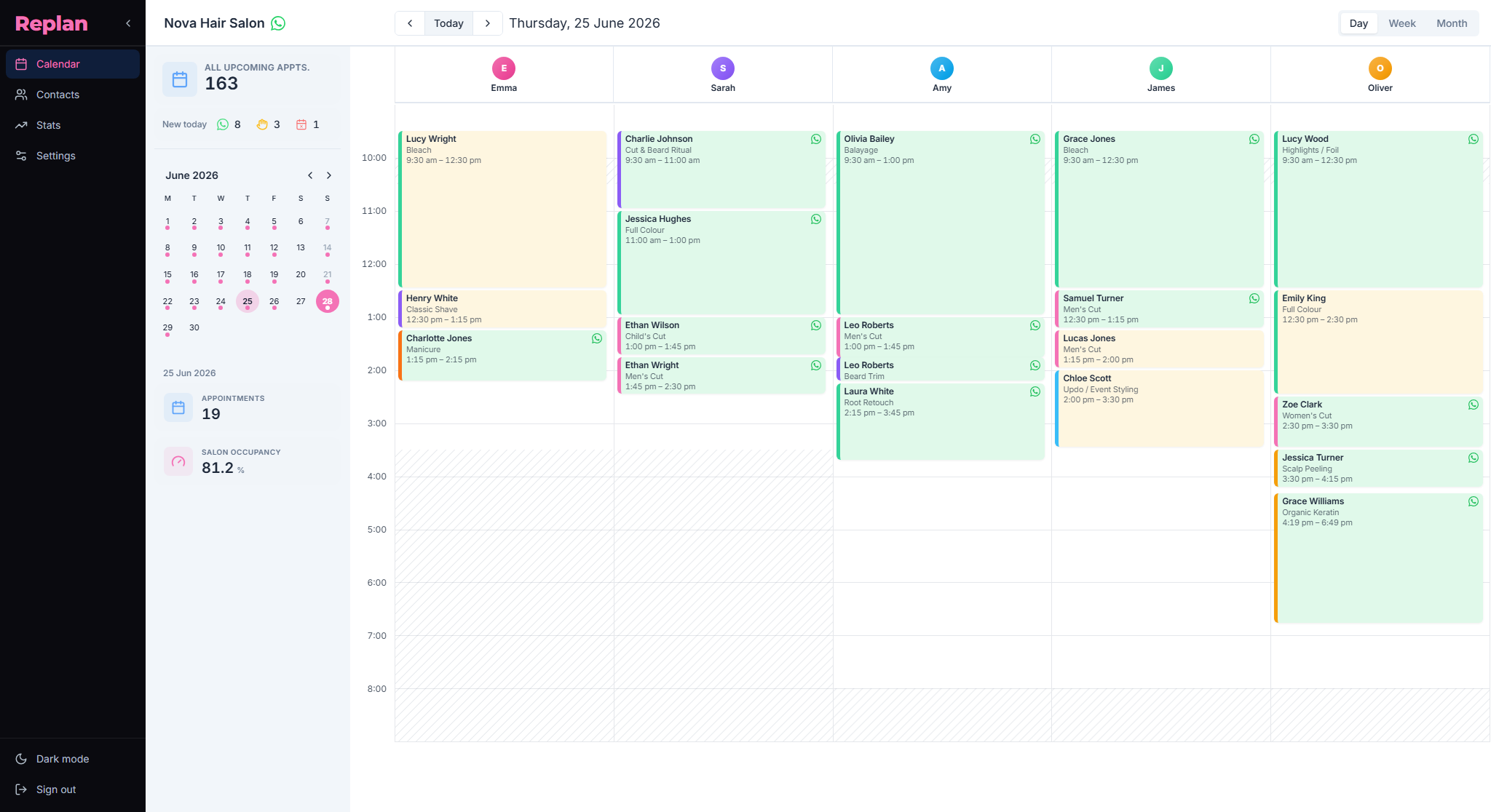
Most salons don't have a technology problem. They have a diary that lives in three places at once: a notebook at reception, loose notes on the owner's phone, and a WhatsApp full of screenshots. It works… until you step away from the desk for a few minutes, someone books an appointment without writing it down, and two clients turn up at the same time.
Moving that diary to a digital calendar doesn't mean setting up a giant program full of modules you'll never touch. It means having one single diary, clear, that the whole team sees at the same time. That's exactly what Replan's free calendar does.
This guide doesn't walk you through button by button. It shows you how to go from scattered diaries to a single digital calendar, how to set it up for your salon, and how to use it in the real working day — without changing everything overnight.
Before Replan: the notebook and the phone as your diary
Before we look at how things get tidier, it's worth naming the mess. When the diary lives on paper and in people's heads, the same three problems almost always show up.
A fragmented diary
Everyone has "their" list: the reception notebook, the owner's phone, the WhatsApp messages. Nobody sees the full day, so nobody is quite sure what's actually booked.
Overlaps and dead gaps
Without seeing each professional's whole day, it's easy to book two appointments at the same time or leave dead gaps between services. Time gets lost in the diary before it's lost in the salon.
The risk of losing appointments
A notebook gets mislaid and a phone gets replaced. The day that happens, the next few weeks of appointments go with it. The whole diary hangs on a physical object or a single person.
The point of moving to a calendar isn't to "go digital" for the sake of it. It's so the diary stops living in your head and on scraps of paper, and moves to one place that can't be lost and that the whole team can check.
What Replan's free calendar actually does
In plain terms: it's an online calendar built for salons, not a generic spreadsheet or a management program trying to cover everything. It feels as intuitive as Google Calendar, but it understands how a salon works.
With the free plan you get, at no cost and with no limits, everything you need to run the day-to-day diary:
- Unlimited appointments and clients. No cap on bookings or client records. You can import and export your contact list whenever you like.
- Services with their real duration. You define a cut, colour, nails, or massage with the exact time each one takes.
- Team and schedules. Every professional has their own column, hours, and breaks; bank holidays and time off take care of themselves.
- Simple metrics. You see occupancy and salon activity without heavy dashboards.
That's enough to run the diary even if every appointment comes in by phone or in person. WhatsApp bookings are an extra step — to stop taking calls — that you can turn on later, but you don't need it to get started. If you'd like to see it working before creating an account, you can take a look at the calendar demo.
Step 1: create your calendar and your team
Sign up and first view
You create the account, add the salon's basic details, and land straight in the calendar view. There's no endless wizard and no settings to decode: the first thing you see is the diary, ready to fill. Spend the first few minutes moving between the day and week views to get a feel for the space.
Set up your services and their durations
This is the step that saves you the most later. Add your services with realistic times: don't put 30 minutes on a colour you know takes 90. When each service has the right duration, the calendar knows how much room an appointment needs, and the impossible overlaps and gaps disappear. It's the foundation everything else rests on.

Add your professionals and their hours
Add each team member with their working hours. Take a salon with two stylists and a barber: each one gets their own column in the calendar, with their gaps visible and their breaks respected. No more three parallel notebooks — the salon's whole day is seen together, on a single screen.
Step 2: move your diary across without losing appointments
The fear here is always the same: "what if I lose an appointment when I switch?". That's why you make the change in phases, not overnight.
First week in "mirror" mode: notebook and calendar together
For a week or two, write every appointment in both places: the usual notebook and Replan. It's a small, temporary effort that builds confidence and proves nothing slips through. Once they see the day already laid out in the calendar, the team starts trusting it on its own.
Add your regular clients
You don't need a CRM or fifteen fields to fill in. With a name and phone number you've already got the client findable in the diary. You can add them by hand as they book, or import your regular contact list in one go. Their record keeps their appointment history, so you know at a glance who's who.

Close the notebook and trust the calendar
There comes a point, usually in the second week, when you no longer need to write things down by hand: every new appointment goes straight into Replan. That's when the diary stops depending on a notebook or a single person. If someone has a day off, the rest of the team still sees the full day.
Step 3: use the calendar in the salon's real day
See the day, the week, and the gaps
The day view tells you what's on now; the week view, how the workload is shaping up. Switch to the month view and you see, at a glance, where there are gaps to fill and where you're flat out — each day with its real occupancy, without adding appointments up in your head.

And the metrics give you real occupancy — both past performance and the weeks ahead — without opening three screens or building a single spreadsheet. You see bookings by channel, occupancy per professional, and how the salon is trending.

Change appointments without getting lost
When a client asks to move their time or switch professional, you don't cross anything out or rewrite it: you drag the appointment or edit it, and that's it. The change is reflected instantly for the whole team, not just for whoever had the notebook in front of them. Nobody ends up serving a client who had already rescheduled.
Log walk-ins on the fly
Someone comes in without an appointment and there's a gap. You add them to the calendar there and then, in their column, and that time is taken like any other booking. The idea is simple: everything that happens in the salon ends up in the calendar, not just what was agreed on the phone. That way the occupancy you see is the real one.

What sets Replan apart from other "online diaries"
Plenty of salon diary programs come with a till, stock control, invoicing, and marketing campaigns. All of that can be useful, but it also adds menus, training, and a monthly fee. And, above all, it tends to take the spotlight off what you actually use every hour: the diary.
Replan works the other way round. It focuses on diary and bookings so you stop losing appointments and living at the mercy of the phone — not on being an "all-in-one". You don't need three different modules to know what's on today: you open it and you see it. If you'd like to dig into why a specialised calendar is usually enough for a small salon, rather than a full platform, we go into it in this guide: free booking software vs an "all-in-one".
How the calendar connects with WhatsApp bookings
The free calendar is already the base where every appointment is logged, however it comes in. That's exactly why it's worth setting it up properly first.
When you later turn on WhatsApp bookings (the premium add-on for putting an end to calls), the appointments that arrive through that channel log themselves onto this same calendar: they block the slot instantly and avoid overlaps, without you copying anything across. Put another way: there aren't two separate systems. First you bring order to the diary; then, whenever you like, you let WhatsApp fill it for you.
Quick questions
1.What if my team is used to the notebook and gets lost with a calendar?
The change happens in phases: first the "mirror" period (notebook and calendar together), then simple views and one colour per professional to get your bearings fast. The goal isn't to add work — it's to remove the duplication of keeping three parallel diaries. Within a week or two, most teams end up preferring the calendar.
2.Does the free calendar have a limit on appointments or clients?
No. The free plan allows unlimited appointments and clients, plus setting up services, hours, and your team. It's a complete diary for the salon's day-to-day, free forever — not a cut-down trial.
3.Do I need to turn on WhatsApp bookings to make the most of the calendar?
No. The calendar is built to run the diary even if every appointment comes in by phone or in person. WhatsApp bookings are the next step — optional and premium — for when you're ready to stop taking calls.
4.What happens if I lose internet access one day?
Let's be honest: the calendar is online, so it needs a connection. If it goes down one day, you can fall back on the notebook as a one-off, just like with any other diary program. But your day-to-day should rest on Replan, which is where the full, up-to-date diary lives.
The calendar is the centre of your day
If your diary is in a notebook, control belongs to whoever holds it; if it's in Replan, control goes back to your team. The first step costs nothing: put your diary in the free calendar, move your appointments across, and see how your salon gets tidier without changing everything at once. And whenever you want to stop taking calls, you'll just have to turn on WhatsApp bookings over this same diary.
Create your free calendar on Replan
Have any questions? Write to us at hello@replanapp.com.
Next read